The ClearDashboard is a resource to help you find hearing aids.

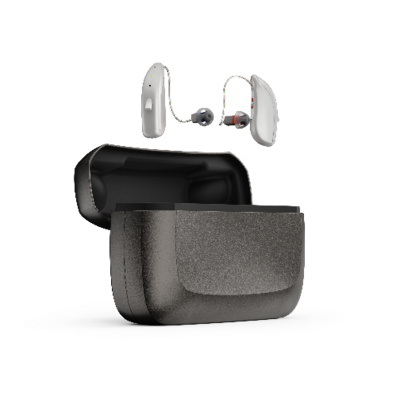
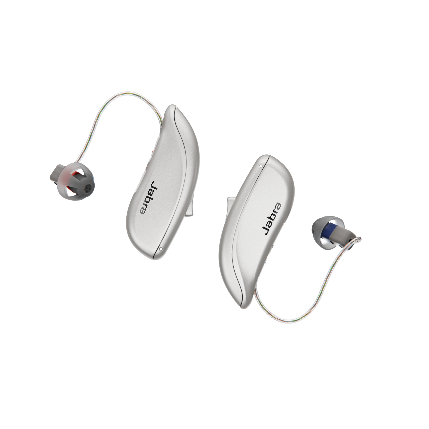
Jabra Enhance Select 500 Basic
- Model
-
Jabra Enhance Select 500 Basic

Pre-programmed to fit, set-up and manage yourself out-of-the-box. No additional assistance and fine-tuning of the hearing aids from the manufactuer's Audidology Team; Hearing aids are color coded on the receivers: Right = Red and Left = Blue
- Company link
- www.jabraenhance.com (Opens in New Tab)
- Color
- Sparkling Silver; Champagne; Gold; Bronze; Warm Gray
- Price per Pair 1
-
$1,795.00
Price varies based on the level of assistance and warranty provided by manufacturer - Check with the manufacturer to select the best self-care option for yourself. Please consult with manufacturer for exisitng pricing options.
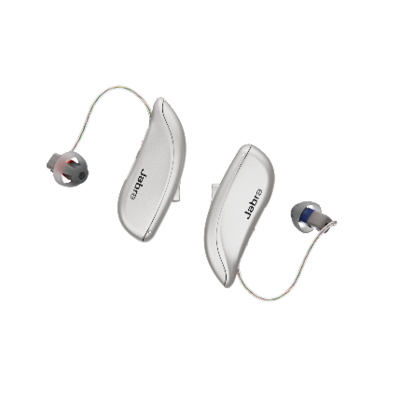
Basic
- Model
-
Jabra Enhance Select 500 Basic
Pre-programmed to fit, set-up and manage yourself out-of-the-box. No additional assistance and fine-tuning of the hearing aids from the manufactuer's Audidology Team; Hearing aids are color coded on the receivers: Right = Red and Left = Blue
- Company link
- Color
-
Sparkling Silver; Champagne; Gold; Bronze; Warm Gray
- Price per Pair 1
-
$1,795.00
Price varies based on the level of assistance and warranty provided by manufacturer - Check with the manufacturer to select the best self-care option for yourself. Please consult with manufacturer for exisitng pricing options.
General
- Power for the device (battery options)
-
Rechargeable
Low battery alert. Battery will drain faster if using wireless features such as streaming from your smartphone or TV. Battery level can be checked with the Jabra Enhance Select App or Charger (Premium charger only)
- Charger
-
Yes
Charger gives you 3 additional hearing aid charges, according to the company.
- How is the volume controlled?
-
App; on Hearing Aid
To adjust volume use the app or the multi-function button on the hearing aid which can control volume, change listening programs and turn Flight Mode off (wireless function off).
- Programming personalization required before hearing aid use.
-
No
Choose from 3 preset hearing profiles suitable for common types of hearing loss.
- How do I fine-tune the device?
-
App; on Hearing Aid
Purchase of Premium Package provides additional fine-tuning adjustments via the manufacturer support representatives - one of the differences between the Premium and Basic models besides the warranty. Select the best option for your hearing self-care.
- Bluetooth used to connect to a smartphone app
-
Yes
The hearing aids must be paired to your smartphone or device prior to using additional features of the hearing aids - download app on the App Store or Google Play. Visit www.jabraenhance.com/compatibility for a list of compatible devices and operating system requirements for both iPhone and Android smartphones. Visit Jabraenhance.com/start for instructions on how to download the smartphone app and connect it to your device. Auracast already built in to the hearing aid.
- Bluetooth used to deliver (stream) sound from smart phone to hearing aid
-
Yes
Achieve streaming from the Jabra Enhance Select App. Double-tap the upper part of your outer ear to accept an incoming phone call. Push button on hearing aid will reject or end a phone call
- Remote control option
-
App
Will adjust volume, listening programs and stream from another device.
- On/Off Control
-
Yes
Push button on hearing aid to turn On/Off. Place in turned-on charger to set hearing aid in sleep mode (can activated Smart Start function to delay the time before your hearing aid turns on after you remove the hearing aid from the charger.
- Telecoil (T-Coil)
-
No
- Accessories
-
Yes
Check with the manufacturer to see what wireless streaming accessories are available to use with your hearing aids, accessory warranties and for any replacement parts (domes, wax guards, receiver wires, etc).
- Water resistant
-
Yes
- Warranty
-
1-year warranty on Service and Loss & Damage
Contact manufacturer for replacement policies and deductible costs
- Can this device be returned?
-
Yes
The manufacturer offers a 100-day return policy. Contact the manufacturer directly for full deatils on their return terms and process. If the hearing aids were purchased from a retailer or website other than the manufacturer’s, the return policy sand process may differ - check with the place of purchase for their specific return terms and instructions.
Support
- Customer Support Prior to Ordering
-
Yes
Pre-programmed to fit, set-up and managed yourself right out of the box.
- Customer Support After You Receive the Device
-
No
No Audiology Team care or services
User Experience
- Satisfied with opening the box and setting up the device 2
-
The score will be available when testing is complete.
- Satisfied with the amount of time it took to open the box and set up the device 3
-
The score will be available when testing is complete.
- Satisfied with the support information that was available (online help, documentation, instruction booklets, etc.) 4
-
The score will be available when testing is complete.
- Satisfied that opening the box and setting up the device was easy 5
-
The score will be available when testing is complete.
- The physical comfort of the device in the ear (after wearing it during the testing procedures) 6
-
The score will be available when testing is complete.
- The physical fit (can user get it in their ear and have it stay in their ear) 7
-
The score will be available when testing is complete.
- Appearance (does the user like the way it looks in their ear) 8
-
The score will be available when testing is complete.
- Set up time 9
-
The score will be available when testing is complete.
- Required assistance in setting up the device 10
-
The score will be available when testing is complete.
Listening Performance
- Sound quality of speech 11
-
The score will be available when testing is complete.
- Sound quality of music 12
-
The score will be available when testing is complete.
- Overall Listening Experience (OLE) 13
-
The score will be available when testing is complete.
- CLEARScore 14
-
The score will be available when testing is complete.
Last Updated: August 17, 2026
Glossary
-
^
Check with the manufacturer or retail location for current pricing information.
-
^
Satisfied with opening the box and setting up the device: The participants reported their satisfaction with the task of opening the box and setting up the device. The percentage scores, on a scale of 0% (Not at all satisfied) to 100% (Completely satisfied), were averaged across the number of participants completing this task.
-
^
Satisfied with the amount of time it took to open the box and set up the device: The participants reported their satisfaction with the amount of time it took them for the task of opening the box and setting up the device. The percentage scores, on a scale of 0% (Not at all satisfied) to 100% (Completely satisfied), were averaged across the number of participants completing this task.
-
^
Satisfied with the support information that was available (online help, documentation, instruction booklets, etc.): The participants reported their satisfaction with the amount of manufacturers supplied instructional materials and online support that were available to assist them in setting up the device. The percentage scores, on a scale of 0% (Not at all satisfied) to 100% (Completely satisfied), were averaged across the number of participants completing this task.
-
^
Satisfied that opening the box and setting up the device was easy: The participants reported their satisfaction with the ease of opening the box and setting up the device. The percentage scores, on a scale of 0% (Not at all satisfied) to 100% (Completely satisfied), were averaged across the number of participants completing this task.
-
^
The physical comfort of the device in the ear (after wearing it during the testing procedures): The participants reported their comfort with the device in the ear after wearing it for approximately 3 hours during the testing procedures. The percentage scores, on a scale of 0% (Uncomfortable) to 100% (Very comfortable), were averaged across the number of participants completing this task.
-
^
The physical fit (can user get it in their ear and have it stay in their ear):The participants reported whether they had any difficulty getting the hearing aid in their ear and having it stay in their ear. The percentage scores, on a scale of 0% (Poor fit) to 100% (Excellent fit), were averaged across the number of participants completing this task. If the hearing aid was not placed correctly in the ear, the researcher adjusted the device before testing was started with the hearing aids.
-
^
Appearance (does the user like the way it looks in their ear): The participants reported whether they were satisfied with the way the hearing aids looked in their ears using the mirrors that were provided to them for this task. The percentage scores, on a scale of 0% (Not at all satisfied) to 100% (Completely satisfied), were averaged with the number of participants completing this task.
-
^
Set up time: The Set-Up Time is the total amount of time it took the participant to prepare the hearing aids for use. It was measured from when they opened the Over-the-Counter (OTC) hearing aid box to when they told the researcher that they were finished with setting the hearing aid for their hearing and communication needs. Assistance was provided by the researcher if the participant was having difficulties with the set-up and asked the researcher for assistance – See Required Assistance in setting up the device.
-
^
Required assistance in setting up the device: A Yes answer indicates that the participant needed some type of assistance in setting up the device. This assistance varied from asking the researcher for any explanations, help with instructions on the use of the hearing aid, programming the device or inserting the device in their ear.
-
^
Sound quality of speech: The participants rated the sound quality of speech when listening to a speech sample, at conversational levels. The percentage scores, on a scale of 0% (Poor) to 100% (Excellent), were averaged across the number of participants completing this task. This score reflects the participants’ subjective opinion of the sound quality of speech based on their setting of the device.
-
^
Sound quality of music: The participants rated the sound quality of music while listening to a music sample through LogiTech computer speakers attached to a Dell laptop computer. The percentage scores, on a scale of 0% (Poor) to 100% (Excellent), were averaged across the number of participants completing this task. The participants’ favorite music artist, song or genre was played from a YouTube video for them to judge the music.
-
^
Overall Listening Experience (OLE): The participants reported their overall listening experience of the hearing aids which includes their perception of sound quality or audio, their emotional responses and personal preferences. This measure was taken after the participant wore the hearing aids for the approximate 3-hour testing procedure. The percentage scores, on a scale of 0% (Very poor) to 100% (Enjoyable), were averaged with the number of participants completing this task.
-
^
CLEARScore: Scoring method not yet finalized and will be shared soon.